

How to access Quick Actions
Select a file on canvas and click Tools on its toolbar to open Quick Actions.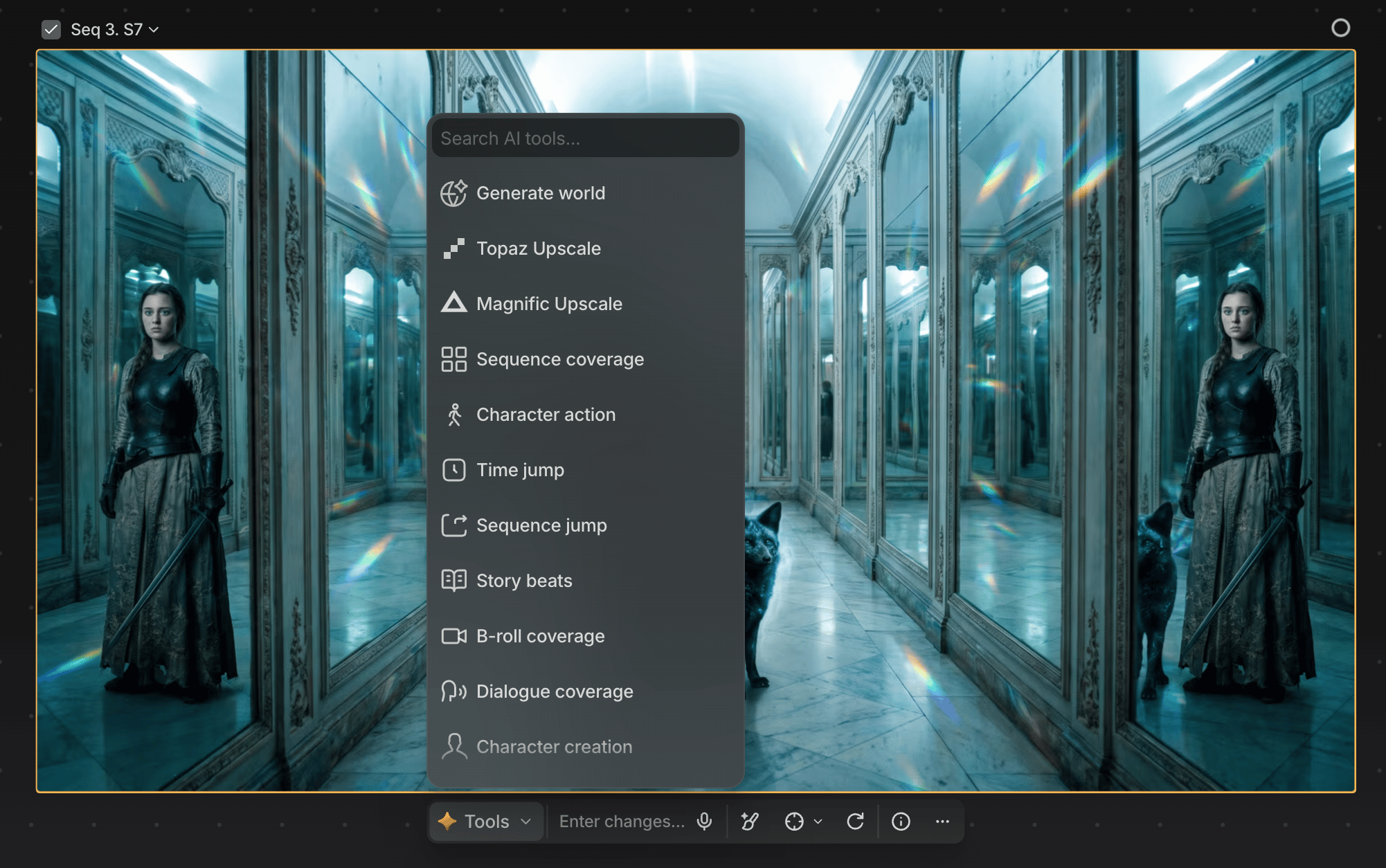
What you can do in the Quick Actions menu
Hover any Quick Action button for a description of what it does. Some Quick Actions return a single image; others create larger output sets, like a 9-image grid.Character sheets
Character creation turns an image with a clear character into an 11-panel character sheet (faces, full body, profiles, expressions) via Nano Banana, a strong reference for consistent results elsewhere in Preview. Results vary; generate a few and pick your favorite.Upscaling
Upscale a file from the same menu: Topaz Upscale, Topaz Astra (video), and Magnific Upscale each open a settings panel with live credit cost. See Upscaling for the full model and control breakdown.More ways to ideate
Quick Actions also cover several tools for generating story and shot ideas fast:- Sequence coverage: varied camera angles and shot sizes for a sequence.
- Story beats: new narrative directions in new settings.
- B-roll coverage: 9 supporting shots of the environment.
- Dialogue coverage: masters, two-shots, over-the-shoulders, and close-ups for a conversation.
- Production design: a grid of location variations with different props, dressing, and materials.
Use Quick Actions intentionally
Quick Actions work best when:- Exploring many directions quickly
- Wanting a repeatable shortcut for a common task