> ## Documentation Index
> Fetch the complete documentation index at: https://docs.preview.io/llms.txt
> Use this file to discover all available pages before exploring further.
# Quick Actions
> One-click tools to help you ideate fast and create with consistency in Preview.
Quick Actions package a proven prompt and settings behind a single click, so you can explore ideas or repeat a common task without writing and tuning a prompt yourself.
## How to access Quick Actions
Select a file on canvas and click **Tools** on its toolbar to open Quick Actions.
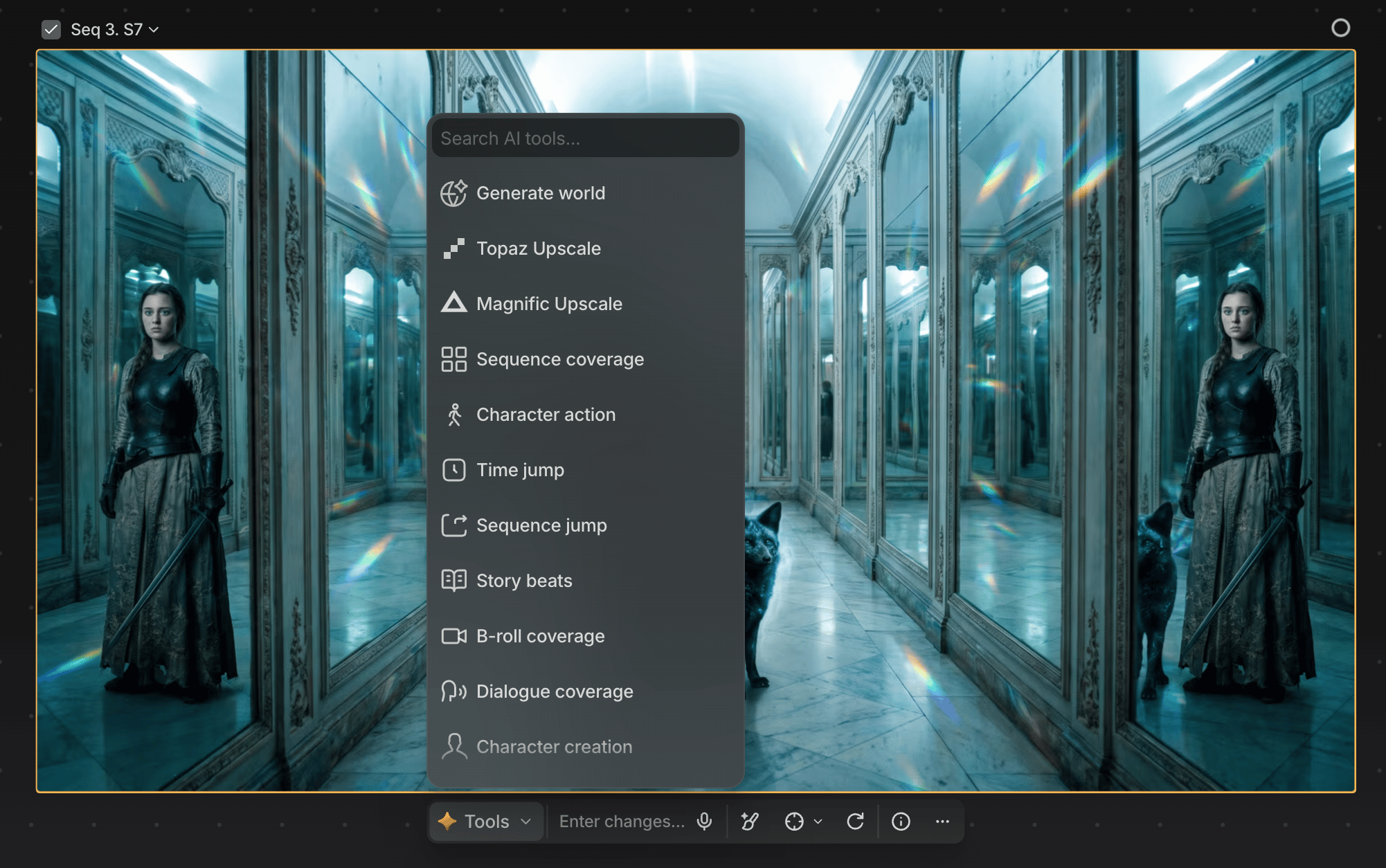 ## What you can do in the Quick Actions menu
Hover any Quick Action button for a description of what it does.
Some Quick Actions return a single image; others create larger output sets, like a 9-image grid.
## Character sheets
**Character creation** turns an image with a clear character into an 11-panel character sheet (faces, full body, profiles, expressions) via Nano Banana, a strong reference for consistent results elsewhere in Preview. Results vary; generate a few and pick your favorite.
## Upscaling
Upscale a file from the same menu: **Topaz Upscale**, **Topaz Astra** (video), and **Magnific Upscale** each open a settings panel with live credit cost. See [Upscaling](/preview/upscaling) for the full model and control breakdown.
## More ways to ideate
Quick Actions also cover several tools for generating story and shot ideas fast:
* **Sequence coverage**: varied camera angles and shot sizes for a sequence.
* **Story beats**: new narrative directions in new settings.
* **B-roll coverage**: 9 supporting shots of the environment.
* **Dialogue coverage**: masters, two-shots, over-the-shoulders, and close-ups for a conversation.
* **Production design**: a grid of location variations with different props, dressing, and materials.
**Character action**, **Time jump**, and **Sequence jump** round out the set; hover any of them for what they do.
Plus [Generate world](/preview/generate-world): turn a reference image into an explorable world and capture new angles from it.
## Use Quick Actions intentionally
Quick Actions work best when:
* Exploring many directions quickly
* Wanting a repeatable shortcut for a common task
Continue to [Generate World](/preview/generate-world) for one of the most distinctive Quick Action workflows.
## What you can do in the Quick Actions menu
Hover any Quick Action button for a description of what it does.
Some Quick Actions return a single image; others create larger output sets, like a 9-image grid.
## Character sheets
**Character creation** turns an image with a clear character into an 11-panel character sheet (faces, full body, profiles, expressions) via Nano Banana, a strong reference for consistent results elsewhere in Preview. Results vary; generate a few and pick your favorite.
## Upscaling
Upscale a file from the same menu: **Topaz Upscale**, **Topaz Astra** (video), and **Magnific Upscale** each open a settings panel with live credit cost. See [Upscaling](/preview/upscaling) for the full model and control breakdown.
## More ways to ideate
Quick Actions also cover several tools for generating story and shot ideas fast:
* **Sequence coverage**: varied camera angles and shot sizes for a sequence.
* **Story beats**: new narrative directions in new settings.
* **B-roll coverage**: 9 supporting shots of the environment.
* **Dialogue coverage**: masters, two-shots, over-the-shoulders, and close-ups for a conversation.
* **Production design**: a grid of location variations with different props, dressing, and materials.
**Character action**, **Time jump**, and **Sequence jump** round out the set; hover any of them for what they do.
Plus [Generate world](/preview/generate-world): turn a reference image into an explorable world and capture new angles from it.
## Use Quick Actions intentionally
Quick Actions work best when:
* Exploring many directions quickly
* Wanting a repeatable shortcut for a common task
Continue to [Generate World](/preview/generate-world) for one of the most distinctive Quick Action workflows.