> ## Documentation Index
> Fetch the complete documentation index at: https://docs.preview.io/llms.txt
> Use this file to discover all available pages before exploring further.
# Preview Agent
> Your AI creative partner that understands your whole project and helps you get anything done, from a shot list to a finished frame.
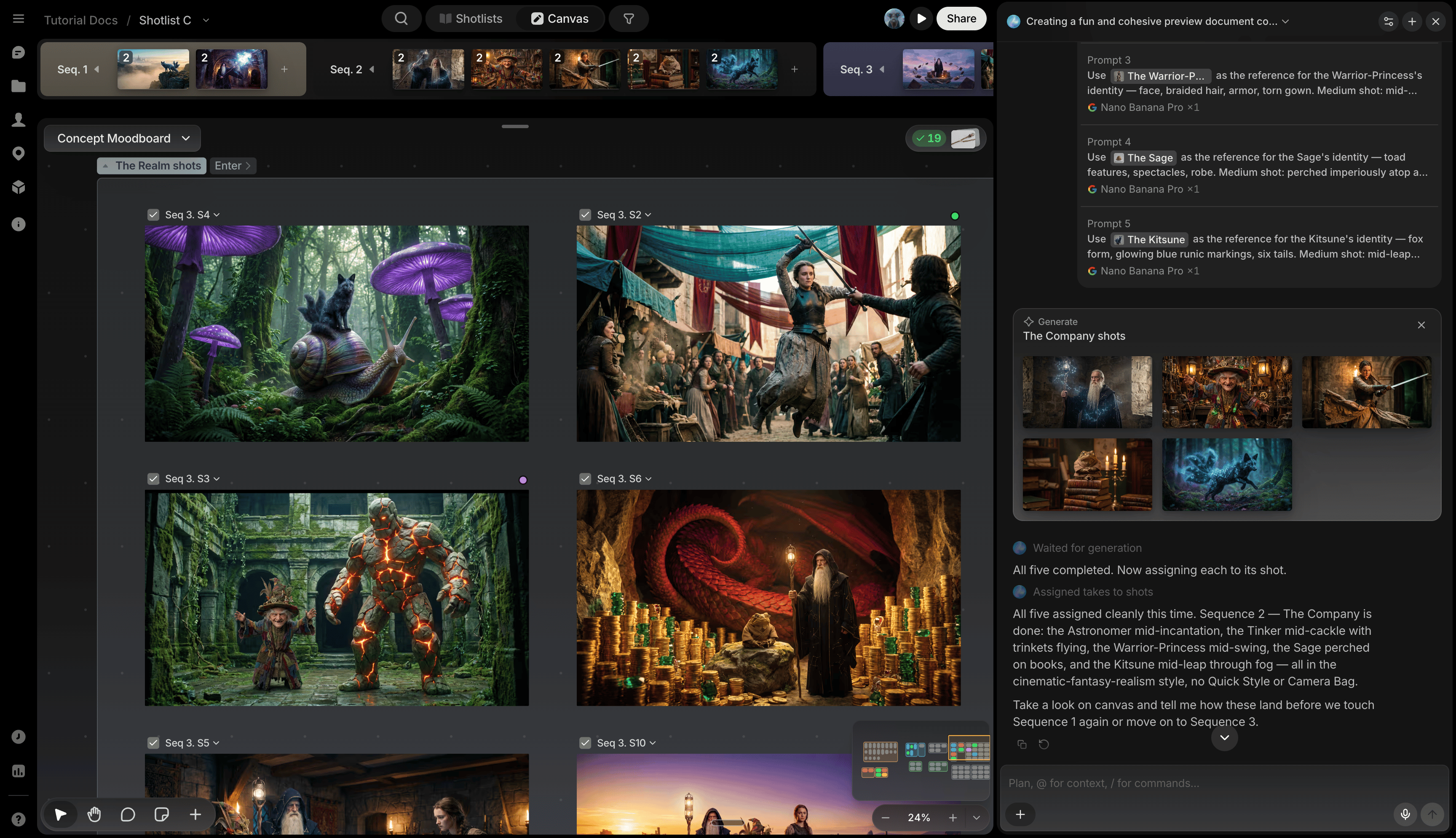
Preview Agent isn't a chatbot bolted onto the side of the app. It's a creative collaborator that sees your whole project and can act anywhere in it: build a shot list, generate and organize files, keep a character consistent across scenes, or clean up a messy canvas.
## Open it
Click the star icon in the page header, or press **⌘/Ctrl + /**, to open it as a chat panel on the right with its own threads: start a new one, rename it, or switch back to an earlier conversation anytime. Type your message or dictate via the mic icon. Type `@` to reference a library item, upload, or past generation. See [Referencing with @](/preview/at-references).
 ## What it can do
* **Bring real filmmaking know-how**: cinematography, story development, shot-list planning, strong prompt-writing, and coverage are all built in, alongside every Quick Action.
* **Understand your project**: reads your story, sequences, shots, canvases, library, tags, and activity history to answer questions and stay in context without re-explaining anything.
* **Manage shots and sequences**: create, update, and batch-edit shots and sequences; assign or move files between them.
* **Manage your library**: create and update Characters, Props, and Locations, attach reference images, and link them to shots.
* **Generate images and video**: queue single or batched generations (up to 8 at a time) on any model, with cost shown before anything runs.
* **Transform files for free**: resize, crop, or extract a frame instantly instead of paying for a full regeneration.
* **Search the web**: pull in outside references or images when a prompt needs them.
* **Keep a paper trail**: files it generates are marked as co-authored, with a link back to the chat that made them, visible from [File View](/preview/preview-window) and the canvas.
## Approving generations
* **Ask mode (default)**: every generation pauses in chat for your approval before it runs.
* **Auto mode**: skips approval, for when you just want it to handle everything. Switch to it from the toggle in the chat header.
## Example prompts
* "Build a shot list from this script."
* "Give me more coverage on shot 12: a few reverse angles."
* "Create a character sheet for my lead so I can keep her consistent."
* "Storyboard scene 3, sketch style."
* "Resize this to 1080x1920. No need to regenerate."
* "Clean up this canvas."
You can't delete anything through Preview Agent; delete manually instead.
## What it can do
* **Bring real filmmaking know-how**: cinematography, story development, shot-list planning, strong prompt-writing, and coverage are all built in, alongside every Quick Action.
* **Understand your project**: reads your story, sequences, shots, canvases, library, tags, and activity history to answer questions and stay in context without re-explaining anything.
* **Manage shots and sequences**: create, update, and batch-edit shots and sequences; assign or move files between them.
* **Manage your library**: create and update Characters, Props, and Locations, attach reference images, and link them to shots.
* **Generate images and video**: queue single or batched generations (up to 8 at a time) on any model, with cost shown before anything runs.
* **Transform files for free**: resize, crop, or extract a frame instantly instead of paying for a full regeneration.
* **Search the web**: pull in outside references or images when a prompt needs them.
* **Keep a paper trail**: files it generates are marked as co-authored, with a link back to the chat that made them, visible from [File View](/preview/preview-window) and the canvas.
## Approving generations
* **Ask mode (default)**: every generation pauses in chat for your approval before it runs.
* **Auto mode**: skips approval, for when you just want it to handle everything. Switch to it from the toggle in the chat header.
## Example prompts
* "Build a shot list from this script."
* "Give me more coverage on shot 12: a few reverse angles."
* "Create a character sheet for my lead so I can keep her consistent."
* "Storyboard scene 3, sketch style."
* "Resize this to 1080x1920. No need to regenerate."
* "Clean up this canvas."
You can't delete anything through Preview Agent; delete manually instead.